Become allergic to your phone.
Meet Offliner. Choose the apps you waste the most time on and Offliner locks them for you. Stay off your phone, build your streak, and watch all that time on your phone turn back into time for more important things.
Built by an ex-addict of every app on this list.
Offliner was built by Rodrigo Atiye, a former heavy user of Instagram, TikTok, YouTube, X, Reddit, Facebook and Twitch.
How does it work?
Pick the apps
Select the apps you want to block.
Set up the detox
Select how long you want to detox from these apps. They will be completely blocked in this period.
Set the daily limit
Select the daily limit allowed for the apps once you finish the detox.
Stay in control
Keep your usage under your set limit to keep your streak (Lock Mode makes this easy). Earn rewards and become an Offliner.
Become an Offliner
Turn hours of scrolling into time for the things you want to accomplish, whether that's getting fit, building a business, learning a skill, or simply having more time for yourself.
What happens when I open a blocked app?
During your detox, there is no ignore button available, so you will not be able to escape when you feel like it. It may feel hard, but that is your brain recalibrating to its natural levels.
- No instant unlock. There is no one tap way back in, anywhere in the app. If you want room to breathe, you decide that in advance, while you are calm.
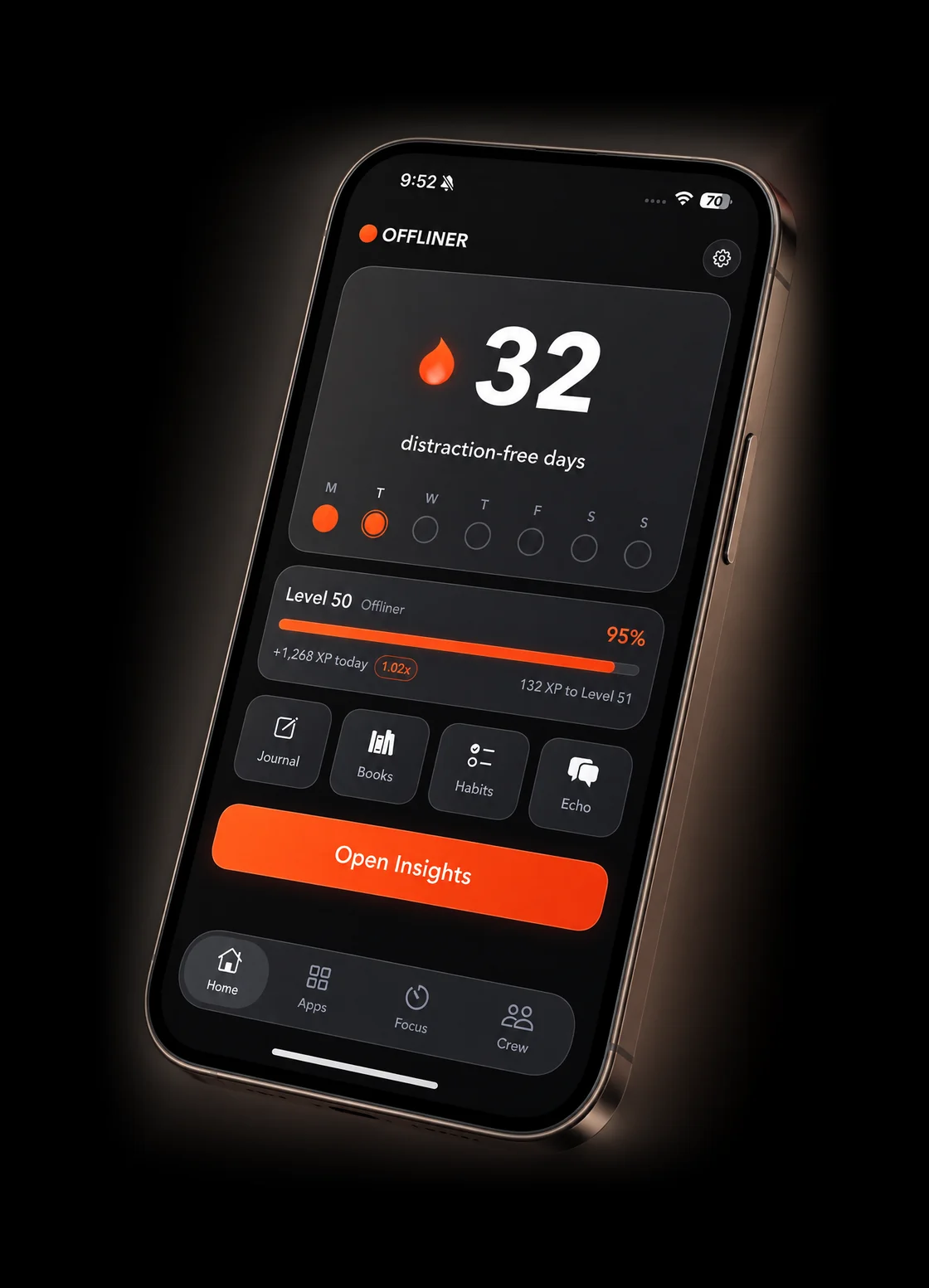
- Replace scrolling easily. Write in your journal, log a habit, read a book, or talk to Echo. All four are already inside Offliner, one tap away, so you are not sent into another app that also scrolls.
What does Offliner include?
App blocking
The default block is a detox. Add an app to a detox and it is completely blocked for the time you select. When the detox ends, the app graduates, and you can set the rules for each app individually (a daily time limit, a countdown before it opens, a friend must give you access, and more). You can also create rules for any app without going through a detox first, but we recommend doing at least one detox to restore your dopamine levels, which makes it easier in the long term.
Streaks and XP
You earn one XP for every minute you are offline. There are 1,440 minutes in a day, so a day fully offline is worth 1,440 XP. A higher streak increases the rate at which you earn XP, and every five levels you unlock something new inside the app.
Focus sessions
Pomodoro timer with breaks, or just a normal timer. You can select the apps to block during these sessions, so they are not able to open.
Insights
Screen time analytics with a built-in algorithm. It notices compulsive patterns and offers you suggestions. "10pm is when you open TikTok the most. Want a night schedule?" One tap and it is a rule.
Echo, journal, and books
Echo is an AI support buddy that can help you through your sustainable screen time journey. You also have a journal, which can help you take notes and work through your wellness experience. Books are gifted to you for reaching certain levels through XP and your streak.
Words from our graduated Offliners.
Love it. I am constantly motivated to keep my streak by reading and exercising, and I have stopped relying on social media.
This app helped me reset and regulate my dopamine levels. After multiple tries with other subscriptions, this was the one that gave me the best results.
What is Offliner?
What is the Offliner app?
Offliner is a screen time and app blocking app for iPhone and iPad. You choose which apps to detox from and which to limit, Offliner enforces it, and every day you stay under your limits counts towards a streak.
How is it different from Apple Screen Time?
Screen Time puts an "Ignore Limit" button on every block screen. It takes about a second and a half to tap, and once you have tapped it once, you will tap it every time. Offliner has no instant unlock anywhere in the app, and Lock Mode means you cannot quietly loosen a rule in the moment you crave. Turn it off and the change only lands tomorrow, when you are calm again.
Then it does the part Screen Time does not attempt at all. Blocking an app leaves a gap, and a gap with nothing in it sends you to the next app on the home screen. So the block screen hands you four things that are already inside Offliner: a library of books to read, a journal to work out what set the craving off, your habits to log, and Echo, which is there at 3am when the craving is. You replace the scroll rather than just losing it.
And staying off is the thing that pays. Every minute you are not in a distracting app earns you a point, clean days build a streak, the streak multiplies everything you earn, and there are fifty levels and six ranks between you and the last one, which is called Offliner. Nothing in the app pays you for opening the app. Screen Time gives you a chart at the end of the week. This gives you something to lose.
What is Lock Mode?
It is the thing that stops you negotiating with yourself. Lock Mode is on by default. While it is on you cannot edit or delete a rule inside its active window, and you cannot pull an app out of a detox early. If you turn it off, it only takes effect the next day, so the decision is never made in the middle of a craving.
How do levels and XP work?
You earn one point for every minute you are not in a distracting app. A day is 1,440 minutes, so a fully offline day is worth 1,440 points before your streak multiplier. Nothing else pays, including opening Offliner itself. Higher levels take more, and every five levels unlocks something new inside the app.
Do I need an account?
Offliner is available on the App Store with a subscription for the full feature set. No sign up and no account. Everything is worked out on your phone and stays there, and Apple hides app names from developers, so nobody here can see which apps you picked.
The next two weeks happen either way.
iPhone and iPad. Cancel anytime in the App Store.